
Blending layers together
Following on from the basic shaders example where we used a shader to render a scene entity, another use for shaders is for 'screen space effects' via 'blending'.
If you've ever used photo editing software with layers, then you're probably already familiar with the concept of blending. It's the process of telling the photo editing software (or game engine in our case) how to render or merge this layer down onto the one below it.
There are two parts to the blending process. Something call the BlendMode (which we won't cover in this example as the usage is probably fairly niche, but it's explained well in other corners of the internet), and BlendMaterials, which allow us to define a custom shader program to alter how the blending actually happens.
This example will perform a simple overlay style effect, but you can use blending to mimic light refraction, mask off areas, make fancy lighting effects, and create other 'screen space effects' where you create a visual effect that affects everything the play sees, such as growing ice when it's cold or applying water effects to all the visible water tiles.
The idea is simple, take layer A as the 'SRC' (source) input, and take layer B as the 'DST' (destination) input, and tell indigo how to use the src to affect the dst. You can simply splat the src onto the dst, of course (beware transparency!). But things get more interesting when you consider that the src (layer) is really just data, and how you use that data is down to you creativity. As an example: The src could be a undulating waves of noise (rendering use a custom shader onto the layer above), if you used that noise to displace which pixel you read from the src, you could mimic viewing the src layer through rippling water...
See Ultraviolets docs for more information on Shaders and shader writing.
Demo
Links
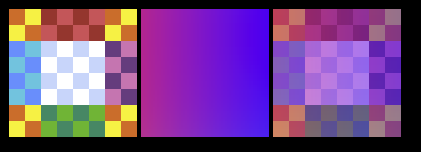
In this scene we render 3 boxes, using 4 layers (mostly for clarity) and 1 blend material.
Left to right:
- Box 1 is a simple graphic with a bitmap texture
- Box 2 is a custom entity running the same custom shader we used in the basic entity shader example.
- Box 3 is made by rendering Box 1 on one layer, then rendering Box 2 on a layer above it, and giving this layer our custom blend material explaining how we'd like it to be merge to the layer below.
In this instance the example shows all the arguments you can supply to a Blending instance,
but you can also construct them with only the BlendMaterial, or even skip it and replace
withBlending with withBlendMaterial.
def present(context: Context, model: Unit): Outcome[SceneUpdateFragment] =
  val gap = 2

  Outcome(
    SceneUpdateFragment(
      LayerKey("demo") -> Layer.Stack(
        Layer.Content(
          Graphic(0, 0, 64, 64, Material.Bitmap(Assets.assets.nineslice))
            .moveTo(10, 10)
        ),
        Layer.Content(
          BlankEntity(0, 0, 64, 64, ShaderData(CustomEntityShader.shader.id))
            .moveTo(10 + 64 + gap, 10)
        ),
        Layer.Content(
          Graphic(0, 0, 64, 64, Material.Bitmap(Assets.assets.nineslice))
            .moveTo(10 + 64 + gap + 64 + gap, 10)
        ),
        Layer
          .Content(
            BlankEntity(0, 0, 64, 64, ShaderData(CustomEntityShader.shader.id))
              .moveTo(10 + 64 + gap + 64 + gap, 10)
          )
          .withBlending(
            Blending(
              entity = Blend.Normal,
              layer = Blend.Normal,
              blendMaterial = CustomBlendMaterial(),
              clearColor = None
            )
          )
      )
    ).withMagnification(Magnification.x2)
  )
A BlendMaterial is nothing more than a class that provides the ShaderData used to tell
Indigo how to merge one layer down onto the layer below it.
In terms of the process, each layer is first rendered, and then the blending is performed. In effect, you are combining to images of the same size in the same location.
final case class CustomBlendMaterial() extends BlendMaterial.SrcAndDst:
  def toShaderData: ShaderData =
    ShaderData(CustomBlendShader.shader.id)
The structure of a blend shader is very similar that seen in the basic entity shader example. There are a number of differences though that all boil down to telling Indigo to expect a blend shader instead of an entity shader.
In terms of the actual code, the main thing to note is that the BlendFragmentEnv has replaced
our usual FragmentEnv, and this gives us access to env.SRC and env.DST, which are the
color values of the current pixel on each layer, where src is merging down to dst.
env.SRC and env.DST are convenience variables that you get for free, but you can always
change which pixel you'd like to reference using
texture2D(SRC_CHANNEL, <some custom UV coordinate).
This shader mixes the two layers together 50-50.
object CustomBlendShader:

  val shader: ShaderProgram =
    UltravioletShader.blendFragment(
      ShaderId("custom-blend-shader"),
      BlendShader.fragment[BlendFragmentEnv](fragment, BlendFragmentEnv.reference)
    )

  @nowarn("msg=unused")
  inline def fragment: Shader[BlendFragmentEnv, Unit] =
    Shader[BlendFragmentEnv] { env =>
      def fragment(color: vec4): vec4 =
        mix(env.DST, env.SRC, 0.5f)
    }